

It’s very easy to restore a database in Microsoft SQL Server 2000 from a backup.
- Open Enterprise Manager.
- Right-click on the Database tab, select All Tasks, and then click Restore Database in the drop-down menu.

-
In the window that opens, you will see the Restore as database section. It will ask where to save the database you restored from backup. I always perform the restore process by naming a new database. For example, as you can see here, I typed restore-backup. If you don’t need to restore over the existing database, you can make a selection here.
-
In the Show backups of database section, you’ll select which database to restore.
-
You can select the date from the First backup to database section.
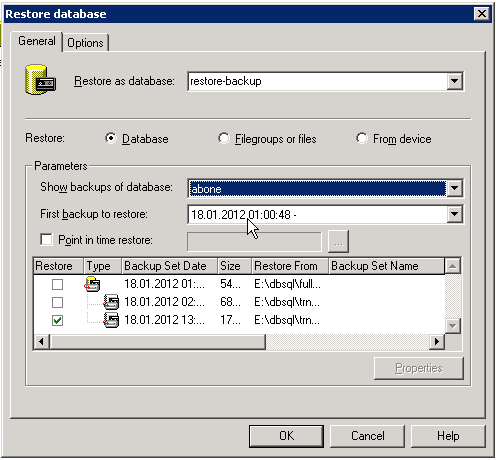
- Now we can restore our backup by pressing the OK button. Once the restore is complete, if you’ve given it a new name, you can check it in the Database section.